The Best Screen for Retro Games
Was Never Sold to Gamers
The monitors in this collection weren't made for living rooms. They were made for broadcast engineers — and that's exactly why retro games have never looked better on anything else.
While consumers were buying Trinitrons at the mall, Sony was quietly selling a different class of CRT out the back door — professional monitors, built for television studios, edit bays, and master control rooms, at prices that would have made a Best Buy shopper faint. They came in two main families, and the letters on the badge tell you everything (decoded here): PVM, the Professional Video Monitor, and BVM, the Broadcast Video Monitor.
The PVM was the workhorse. Studios used them for previewing feeds, hospitals wired them to imaging equipment, security desks stacked them in walls. Compared to a consumer TV, a PVM has a finer aperture grille, far higher line resolution, and — the part that matters most to game collectors — direct RGB input. A consumer TV of the era took a composite signal, a single muddy wire where the colors have already been smeared together. A PVM takes red, green, and blue as separate signals, straight from the console's video chip, nothing lost in translation. Plug a Genesis or a Super Nintendo into one over RGB and the image snaps into focus like someone cleaned a window you didn't know was dirty.
The BVM was something else entirely: Sony's reference grade, the monitors broadcast engineers used to judge whether the picture itself was correct. Hand-selected tubes, modular input cards (the BKM cards hunted on the wanted list), calibration controls deep enough to get lost in, and new prices that ran well into five figures — for a monitor a viewer at home would never see. A BVM doesn't try to make the picture pretty. It shows you the truth, scanline by scanline. For pixel art drawn by hand in the '80s and '90s, the truth turns out to be gorgeous.
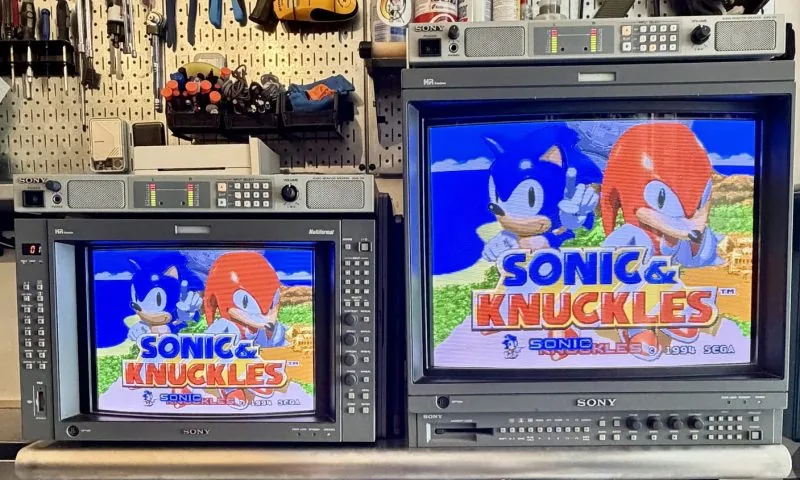
PVM vs. BVM at a glance
| Attribute | PVM — Professional Video Monitor | BVM — Broadcast Video Monitor |
|---|---|---|
| Job | Production — previewing feeds in studios, edit bays, hospitals, security walls | Reference — the seat where an engineer judged whether the picture itself was correct |
| Resolution | 600–800 TV lines (PVM-2950Q 600, PVM-20L5 800) | 800–1,000 TV lines (BVM-A14F5U 800, BVM-20E1U 1,000 — a number Sony hit once) |
| Tube | Trinitron or HR Trinitron | HR Trinitron, hand-selected; E-grade on the 20E1U |
| Inputs | Fixed on the back panel: RGB/component BNCs, composite, S-Video; one option slot on the late 20L5 | Modular BKM cards in 3–4 slots; the E/F series keeps one fixed RGB block, the A series has no analog input at all until a card is fitted |
| Formats | 15 kHz standard definition on most (the 2950Q: NTSC, PAL, SECAM); the late 20L5 is multiscan, 240p to 1080i | Model by model: strictly SD on the E/F series (240p, 480i, 576i); 240p to 1080i and 24PsF on the A series |
| Calibration | Front-panel picture controls | Deep — beam-landing correction, digital uniformity, a probe that walks the white point to D65 on the A series |
| Weight | PVM-20L5 68 lb; PVM-2950Q 115 lb | BVM-20E1U 82 lb; BVM-A14F5U 57 lb |
| For a game collector | The right answer for most — the picture gap to a BVM is small | The sharpest 240p ever rendered (the 20E1U), or reference work |
The fleet here — thirteen units across eight models, documented in Trinitron Fleet, Vol. 1 — grew out of a single purchase more than a decade ago: a 13-inch PVM-1354Q. One good monitor is a slippery slope; that first PVM has since moved on, the way first monitors do, but it opened the door to everything on the Monitor Fleet page.
One good monitor is a slippery slope.
Asked to pick just one to recommend today, the answer from this garage is the PVM-20L5 — a late-generation 20-inch multiformat unit that handles nearly anything you feed it, big enough to matter, versatile enough to be the only monitor you need. The sentimental pick is different: the PVM-2950Q, the 29-inch cube in the game room. It's an unreasonable object — enormous, heavy, shaped like a monolith — and Super Mario Bros. on that much curved glass is a religious experience. Versatility is a reason to buy a monitor. The 2950Q is a reason to keep one.
Quick answers
What is the difference between a PVM and a BVM?
Grade. A PVM is Sony's production monitor — the workhorse a studio used to preview a feed. A BVM is the reference monitor — the seat where an engineer judged whether the picture itself was correct, with hand-selected tubes, modular BKM input cards, calibration depth a PVM was never given, and up to 1,000 TV lines against a PVM's 600 to 800. Both take RGB, and both leave any consumer TV far behind.
Is a BVM better than a PVM for retro games?
Sharper, yes. But the gap between a well-set-up PVM and a BVM is far smaller than the gap between either of them and anything sold in a store. For 240p the BVM-20E1U is the definitive large-format display; for a collection that runs from 240p to HD, a multiformat PVM-20L5 covers more ground than most BVMs. Most collectors are well served by a PVM.
Do PVMs and BVMs take RGB from a console?
Yes — direct RGB is the point of both. A PVM carries RGB/component BNCs on its back panel; a BVM takes RGB through a fixed input block on the E/F series or an option card on the A series. A console reaches either over an RGB SCART cable and a SCART to 4 BNC breakout cable — the chain this collection runs →
What are BKM cards?
Sony's plug-in input boards for BVMs, and for the single option slot on late PVMs: decoders for composite and S-Video, SDI and HD-SDI inputs, analog RGB and component. A BVM is only as useful as the cards in it, which is why the hunt for them has a standing entry on the wanted list. Which card fits which monitor is its own reference page →
Which Sony professional monitor should a collector buy first?
From this garage, the PVM-20L5: 800 TV lines, multiscan from 240p to 1080i, one option slot, and versatile enough to be the only monitor you need. There is a full pre-purchase checklist for it here →
Sitting on professional Sony gear you don't want to freight across the country? The arcade buys — and when the fleet consolidates, departures land on the For Sale page. Email orlandusarcade@gmail.com.
How to cite: Orlandu’s Arcade (“Orlandu81”), PVM vs. BVM: Sony's Pro Monitors Explained, orlandu.com, 2026, https://www.orlandu.com/pvm-vs-bvm.html